Lovable 能通过对话生成一个可用的 Web 应用。如果您的应用要卖东西,可以用 SnapEX Pay 接收加密货币:客户点击按钮,在 SnapEX Pay 支付页面用 USDT 或其他 70 多种币种付款,您的应用通过带签名的 Webhook 得知付款结果。本指南介绍安全的接入方式:一段可以粘贴到 Lovable 的提示词,以及最终应当生成的代码。
工作原理
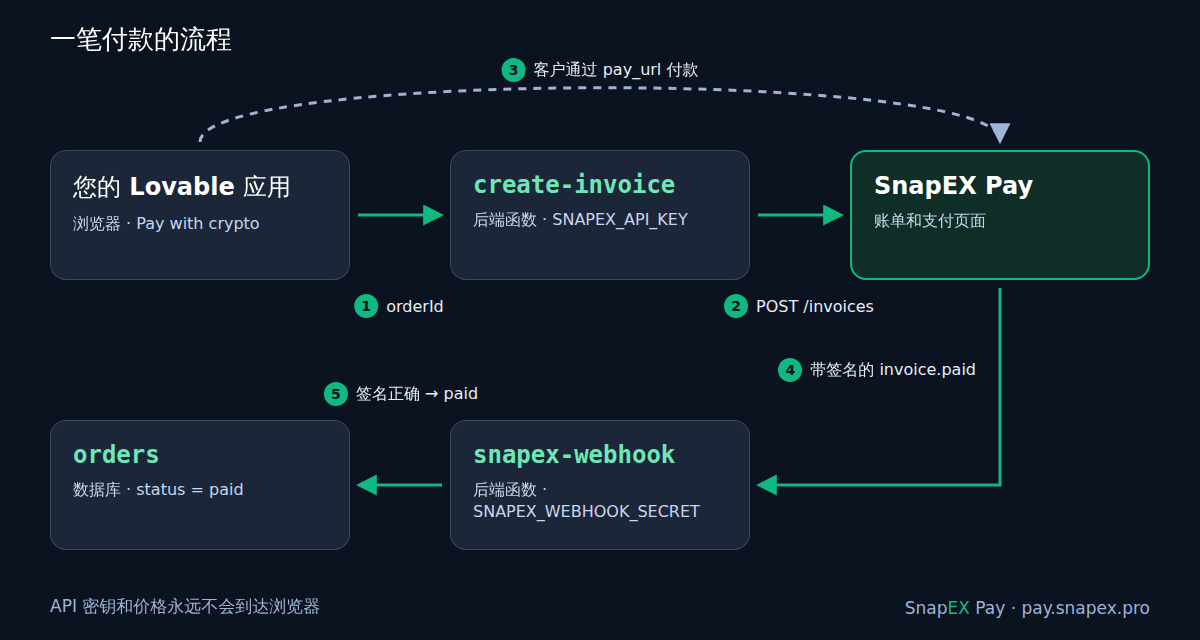
- 客户在您的应用中点击 Pay with crypto 按钮。
- 后端函数(
create-invoice)从数据库读取订单,并通过POST /api/v1/merchant/invoices创建账单。API 密钥从服务器上的密钥中读取。 - 函数返回
pay_url,浏览器打开 SnapEX Pay 支付页面。 - 账单付清后,SnapEX Pay 向第二个函数(
snapex-webhook)发送带签名的invoice.paidWebhook。 - 该函数校验签名,并在数据库中把订单标记为已支付。
浏览器既看不到 API 密钥,也不决定价格和支付状态。这正是关键:任何人都能调用您应用中的函数,也能篡改浏览器发送的内容,所以价格和"已支付"标记必须来自服务器。
第 1 步:获取 API 密钥
在 pay.snapex.pro 开户,然后在商户后台打开 开发者 → 获取 API 密钥。密钥以 smk_ 开头,只显示一次,请立即复制。它拥有 Merchant API 的全部权限(包括提现),因此只能放在后端密钥中,绝不能写进前端代码、VITE_ 变量或聊天里。在后台重新签发密钥会立即使旧密钥失效。
也可以不经网站,直接通过 API 开户:
curl -sS -X POST https://pay.snapex.pro/api/v1/merchant/signup \
  -H "Content-Type: application/json" \
  -H "Accept: application/json" \
  -d '{"email": "[email protected]", "agent": "lovable"}'
响应中包含 api_key(只显示一次)、用于登录后台的 login 和自动生成的 password,以及 cabinet_url。
第 2 步:让 Lovable 搭建结账功能
把下面的提示词粘贴到项目聊天中。提示词是英文的,Lovable 在任何项目中都能理解。当 Lovable 索要 SNAPEX_API_KEY 时,请在安全的密钥表单中填写,而不是发在聊天里。SNAPEX_WEBHOOK_SECRET 先跳过(Skip),第 3 步才会拿到。
Add a crypto checkout with SnapEX Pay.
API docs: https://pay.snapex.pro/partner/merchant/docs

Server side only, never in frontend code:
- Secrets: SNAPEX_API_KEY, SNAPEX_WEBHOOK_SECRET, SNAPEX_ENVIRONMENT
  ("test" for now), SITE_URL (the app's public URL). Ask me for them
  with the secret form.
- Table orders: id uuid, amount_usd numeric, status text default
  'pending', snapex_invoice_id text, pay_url text, invoice_expires_at
  timestamptz, paid_at timestamptz. Users read only their own orders;
  only server code changes status.
- Function create-invoice, input { orderId }: load the order on the
  server (the amount comes from the database, never from the browser).
  If pay_url is set and invoice_expires_at is in the future, return it.
  Otherwise POST https://pay.snapex.pro/api/v1/merchant/invoices with
  headers Authorization: Bearer SNAPEX_API_KEY, Content-Type and Accept:
  application/json, Idempotency-Key: <external_id>. JSON body:
  amount_usd (string, 2 decimals), external_id "<order id>:<8 random
  characters>", description, environment SNAPEX_ENVIRONMENT, success_url
  and cancel_url SITE_URL/orders/<order id>. Save data.invoice_id,
  data.pay_url and data.expires_at on the order; return { pay_url }.
- Function snapex-webhook, public (no user login check). Read the raw
  body as text. Header Webhook-Signature must equal "v1=" + hex
  HMAC-SHA256 of "<Webhook-Timestamp>.<raw body>" keyed with
  SNAPEX_WEBHOOK_SECRET; compare in constant time; reject a
  Webhook-Timestamp more than 300 seconds off; answer 400 if the check
  fails. On type "invoice.paid" with data.environment equal to
  SNAPEX_ENVIRONMENT: the order id is data.external_id before ":"; if
  data.amount_usd is not below the order amount, set status 'paid' and
  paid_at = data.paid_at only where status is not 'paid'. Answer 200
  quickly; answer 500 only if the database update fails.

Frontend: a "Pay with crypto" button on the order page that calls
create-invoice and opens pay_url; the order page shows the status.
Lovable 会把提示词变成可运行的代码;您可以打开代码,与下面的参考代码对照。
第 3 步:连接 Webhook
- 复制
snapex-webhook函数的地址。使用内置后端的应用:More → Database → Manage → Edge functions,打开该函数并点击 Copy URL。如果找不到,可以在聊天中让 Lovable 告诉您函数的公网 URL。 - 在 SnapEX Pay 后台打开 开发者 → Webhook,粘贴 URL 并点击 保存。URL 必须是公网可访问的
https://地址。 - 首次保存时,后台只显示一次签名密钥
whsec_…。在 Lovable 的 More → Settings → Secrets → Add secret 中添加它,名称为SNAPEX_WEBHOOK_SECRET。
后台设置的 Webhook 会接收所有类型的事件;函数只处理 invoice.paid,其他事件一律返回 200。如果您更习惯用 API:POST /api/v1/merchant/webhooks,请求体 {"url": "…", "events": ["invoice.paid"]},即可为所列事件创建端点(订阅 invoice.paid 时也会收到 invoice.partially_paid),secret 只返回一次。
第 4 步:不花真钱进行测试
只要 SNAPEX_ENVIRONMENT 为 test,所有账单都是测试账单:
- 在应用中创建订单并点击 Pay with crypto。支付页面会显示 Test 标记。
- 选择任意币种。无需转账:大约 10 秒后账单会自动变为已支付。
- Webhook 到达,
data.environment = "test",应用中的订单变为已支付。
测试账单与正式账单经历相同的状态、发送相同的 Webhook,但永远不会改变您的余额。如果订单没有变为已支付,请查看后台的 开发者 → Webhook 推送记录(函数返回的响应码,以及 重新发送 按钮)和 Lovable 中的函数日志。测试模式详情:如何不用真实资金测试加密货币支付。
第 5 步:切换到正式环境
把密钥 SNAPEX_ENVIRONMENT 改为 live。新账单即为正式账单,Webhook 函数会忽略测试事件,测试付款永远不会把真实订单标记为已支付。已支付的账单以 USDT 计入您的 SnapEX Pay 余额。
代码
以下是两个函数在内置后端(Supabase Edge Functions,Deno)上的样子。您不需要手写:放在这里是为了核对 Lovable 生成的代码,或作为参考提供给 Lovable。
create-invoice
// supabase/functions/create-invoice/index.ts
import { createClient } from "npm:@supabase/supabase-js@2";

const SNAPEX_API = "https://pay.snapex.pro/api/v1/merchant";
const cors = {
  "Access-Control-Allow-Origin": "*",
  "Access-Control-Allow-Headers":
    "authorization, x-client-info, apikey, content-type",
  "Access-Control-Allow-Methods": "POST, OPTIONS",
};
const json = (body: unknown, status = 200) =>
  new Response(JSON.stringify(body), {
    status,
    headers: { ...cors, "Content-Type": "application/json" },
  });

Deno.serve(async (req) => {
  if (req.method === "OPTIONS") return new Response(null, { headers: cors });
  if (req.method !== "POST") return json({ error: "method not allowed" }, 405);

  const { orderId } = await req.json().catch(() => ({}));
  if (typeof orderId !== "string" || orderId === "") {
    return json({ error: "orderId is required" }, 400);
  }

  // The price comes from your database, never from the browser.
  const db = createClient(
    Deno.env.get("SUPABASE_URL")!,
    Deno.env.get("SUPABASE_SERVICE_ROLE_KEY")!,
  );
  const { data: order } = await db.from("orders")
    .select("id, amount_usd, status, pay_url, invoice_expires_at")
    .eq("id", orderId).maybeSingle();
  if (!order) return json({ error: "order not found" }, 404);
  if (order.status === "paid") return json({ error: "already paid" }, 409);

  // An open invoice is reused: a second click opens the same page.
  const open = order.invoice_expires_at &&
    new Date(order.invoice_expires_at) > new Date();
  if (order.pay_url && open) return json({ pay_url: order.pay_url });

  // external_id is unique per merchant account: a new invoice for the
  // same order (after the old one expired) gets a new suffix.
  const externalId = `${order.id}:${crypto.randomUUID().slice(0, 8)}`;
  const site = Deno.env.get("SITE_URL"); // https://your-app.lovable.app
  const back = site ? `${site}/orders/${order.id}` : undefined;

  const res = await fetch(`${SNAPEX_API}/invoices`, {
    method: "POST",
    headers: {
      "Authorization": `Bearer ${Deno.env.get("SNAPEX_API_KEY")}`,
      "Content-Type": "application/json",
      "Accept": "application/json",
      "Idempotency-Key": externalId,
    },
    body: JSON.stringify({
      amount_usd: Number(order.amount_usd).toFixed(2),
      external_id: externalId,
      description: `Order ${order.id}`,
      environment: Deno.env.get("SNAPEX_ENVIRONMENT") ?? "test",
      success_url: back,
      cancel_url: back,
    }),
  });
  const payload = await res.json().catch(() => ({}));
  if (!res.ok) {
    console.error("SnapEX Pay error", res.status, JSON.stringify(payload));
    return json({ error: "could not create the invoice" }, 502);
  }

  const invoice = payload.data;
  await db.from("orders").update({
    snapex_invoice_id: invoice.invoice_id,
    pay_url: invoice.pay_url,
    invoice_expires_at: invoice.expires_at,
  }).eq("id", order.id);

  return json({ pay_url: invoice.pay_url });
});
要点:
Idempotency-Key是必填项。 使用同一个键重试,会返回同一张账单,而不会再创建一张。- 每个
external_id在一个账户内只能使用一次,测试和正式环境都一样。所以它带有一个简短的随机后缀:账单过期后(默认 30 分钟,expires_in可设为 60 秒到 24 小时),再次点击会为同一订单创建新账单。 - 响应 为
{"data": {...}},包含invoice_id、pay_url、status、expires_at、environment、amount_usd和您的external_id。 - 也可以用其他货币定价:用
price_amount和price_currency(例如"EUR")代替amount_usd,SnapEX Pay 会自动换算。fee_on: "customer"表示手续费由客户在价格之外支付,详见 加密货币账单的手续费由谁支付。
snapex-webhook
// supabase/functions/snapex-webhook/index.ts
import { createClient } from "npm:@supabase/supabase-js@2";

const enc = new TextEncoder();

async function hmacHex(secret: string, message: string): Promise<string> {
  const key = await crypto.subtle.importKey(
    "raw", enc.encode(secret), { name: "HMAC", hash: "SHA-256" },
    false, ["sign"],
  );
  const mac = await crypto.subtle.sign("HMAC", key, enc.encode(message));
  return Array.from(new Uint8Array(mac))
    .map((b) => b.toString(16).padStart(2, "0")).join("");
}

// Constant time: the duration does not depend on where the strings differ.
function safeEqual(a: string, b: string): boolean {
  const x = enc.encode(a);
  const y = enc.encode(b);
  let diff = x.length ^ y.length;
  for (let i = 0; i < Math.max(x.length, y.length); i++) {
    diff |= (x[i] ?? 0) ^ (y[i] ?? 0);
  }
  return diff === 0;
}

const cents = (usd: unknown) => Math.round(Number(usd) * 100);
const reply = (text: string, status = 200) => new Response(text, { status });

Deno.serve(async (req) => {
  if (req.method !== "POST") return reply("method not allowed", 405);
  const secret = Deno.env.get("SNAPEX_WEBHOOK_SECRET");
  if (!secret) return reply("webhook secret is not set", 500);

  // 1. The raw body, exactly as received: the signature covers these bytes.
  const body = await req.text();
  const ts = req.headers.get("Webhook-Timestamp") ?? "";
  const signature = req.headers.get("Webhook-Signature") ?? "";

  // 2. "v1=" + HMAC-SHA256 of "{timestamp}.{body}" keyed with whsec_….
  const expected = "v1=" + await hmacHex(secret, `${ts}.${body}`);
  // 3. Not older than 5 minutes: every retry carries a fresh timestamp.
  const age = Math.abs(Date.now() / 1000 - Number(ts));
  if (!/^\d+$/.test(ts) || age > 300 || !safeEqual(signature, expected)) {
    return reply("invalid signature", 400);
  }

  const event = JSON.parse(body);
  if (event.type !== "invoice.paid") return reply("ok"); // nothing to do

  // Test events never touch live orders, and the other way round.
  const invoice = event.data;
  const env = Deno.env.get("SNAPEX_ENVIRONMENT") ?? "test";
  if (invoice.environment !== env) return reply("ignored");

  const orderId = String(invoice.external_id ?? "").split(":")[0];
  const db = createClient(
    Deno.env.get("SUPABASE_URL")!,
    Deno.env.get("SUPABASE_SERVICE_ROLE_KEY")!,
  );
  const { data: order } = await db.from("orders")
    .select("id, amount_usd, status").eq("id", orderId).maybeSingle();
  if (!order) {
    console.error("paid invoice of an unknown order", invoice.invoice_id);
    return reply("unknown order");
  }
  if (cents(invoice.amount_usd) < cents(order.amount_usd)) {
    console.error("invoice amount is below the order", invoice.invoice_id);
    return reply("amount mismatch");
  }

  // Only an unpaid order changes: a repeated delivery does nothing.
  const { error } = await db.from("orders").update({
    status: "paid",
    paid_at: invoice.paid_at,
    snapex_invoice_id: invoice.invoice_id,
  }).eq("id", order.id).neq("status", "paid");
  // A non-2xx answer makes SnapEX Pay retry the delivery later.
  if (error) return reply("database error", 500);

  return reply("ok");
});
SnapEX Pay 调用这个函数时没有用户会话,所以后端不能要求它携带用户令牌。在 Supabase 中,这在 supabase/config.toml 里按函数设置:
[functions.snapex-webhook]
verify_jwt = false
在这里,签名校验取代了登录校验:只有它能证明请求可信。请求中包含:
| 请求头 | 含义 |
|---|---|
Webhook-Id |
事件的唯一 ID;每次重试都相同。 |
Webhook-Timestamp |
本次尝试的 Unix 时间(秒);每次重试都会更新。 |
Webhook-Signature |
v1= + 对 {Webhook-Timestamp}.{原始请求体} 计算的 HMAC-SHA256 小写十六进制值。 |
请求体为 {"id", "type", "created_at", "data"};对于 invoice.* 事件,data 就是账单,格式与 API 返回的一致:invoice_id、status、environment、amount_usd、paid_at 以及您的 external_id。
关于投递需要了解:任何 2xx 都算成功;连接超时 5 秒,整个请求超时 15 秒;失败的 invoice.paid 会重试,总共最多 5 次(大约在 10 秒、1 分钟、5 分钟和 15 分钟后)。同一事件可能到达两次,因此上面的更新只修改尚未支付的订单。只有 invoice.paid 表示"可以发货":invoice.partially_paid 表示客户只付了一部分,且补款期限已过。更多内容:加密货币支付 Webhook:校验签名,处理重试和重复投递。
支付按钮
import { useState } from "react";
import { supabase } from "@/integrations/supabase/client";

export function PayWithCrypto({ orderId }: { orderId: string }) {
  const [busy, setBusy] = useState(false);

  async function pay() {
    setBusy(true);
    const { data, error } = await supabase.functions.invoke(
      "create-invoice",
      { body: { orderId } },
    );
    if (error || !data?.pay_url) {
      setBusy(false);
      alert("Could not start the payment. Please try again.");
      return;
    }
    window.location.href = data.pay_url; // the SnapEX Pay payment page
  }

  return (
    <button onClick={pay} disabled={busy}>
      {busy ? "Opening…" : "Pay with crypto"}
    </button>
  );
}
按钮只发送订单 ID。付款后客户会回到 success_url;订单页面应从数据库读取状态,因为把订单标记为已支付的是 Webhook,而不是客户返回您的网站。
较新的 Lovable 应用
2026 年 5 月 13 日起创建的 Lovable 应用基于 TanStack Start,通常把服务器代码放在应用内部,以 server functions 和 API routes 的形式运行,而不是 Edge Functions。方案不变:密钥放在密钥存储中,账单在服务器上创建,Webhook 发到一个公开路由,该路由读取原始请求体并首先校验签名。上面的提示词没有指定技术,Lovable 会为您的应用选择合适的方式。此时 Webhook 地址就是应用的 URL 加上路由路径,可以让 Lovable 告诉您。服务器路由在发布时才更新:测试 Webhook 前请先发布应用。
能否改用 SnapEX Pay 的 MCP 服务器?
只能在开发阶段作为辅助。SnapEX Pay 提供 MCP 服务器 https://pay.snapex.pro/mcp,Lovable 可以把它添加为自定义 MCP 服务器(Connectors → Add custom → MCP server,认证方式选 Bearer token or API key,填入您的 smk_ 密钥)。这样 Lovable 的聊天在构建应用时可以查询币种、汇率和手续费,或检查测试账单。但聊天连接永远不会成为已发布应用的一部分,结账功能本身仍然需要上面的两个函数。MCP 详情:pay.snapex.pro/mcp。
检查清单
SNAPEX_API_KEY和SNAPEX_WEBHOOK_SECRET只放在后端密钥中;没有任何以VITE_开头的变量。- 价格在服务器上读取;浏览器只发送订单 ID。
- Webhook 函数读取原始请求体,以恒定时间比较签名并检查时间戳,不匹配时返回 400。
- 订单只会因
invoice.paid变为已支付,而且只变一次。 - 测试与正式环境由
SNAPEX_ENVIRONMENT区分。
完整 API 参考:SnapEX Pay API 文档。