Lovable builds a working web app from a chat. If that app sells something, you can take payment in crypto with SnapEX Pay: the customer presses a button, pays on the SnapEX Pay page in USDT or 70+ other coins, and your app learns about the payment from a signed webhook. This guide shows the safe way to wire it up, with a prompt you can paste into Lovable and the code it should end up with.
How it works
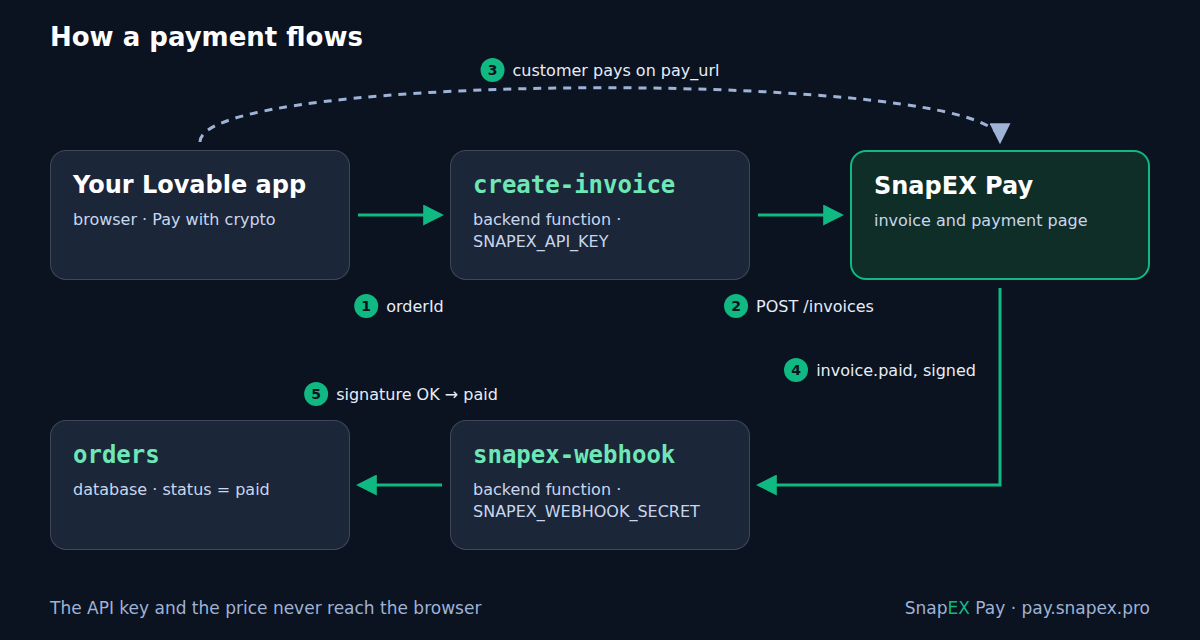
- The customer presses Pay with crypto in your app.
- A backend function (
create-invoice) reads the order from your database and creates an invoice withPOST /api/v1/merchant/invoices. The API key is read from a secret on the server. - The function returns
pay_url, and the browser opens the SnapEX Pay payment page. - When the invoice is paid, SnapEX Pay sends a signed
invoice.paidwebhook to a second function (snapex-webhook). - That function checks the signature and marks the order paid in your database.
The browser never sees the API key and never decides the price or the payment status. That is the whole point: anyone can call a function in your app or edit what the browser sends, so the price and the "paid" flag must come from the server.
Step 1. Get an API key
Open an account on pay.snapex.pro, then go to the merchant cabinet → Developers → Get API key. The key starts with smk_ and is shown once: copy it right away. It carries every Merchant API permission, including payouts, so it belongs only in a backend secret, never in frontend code, a VITE_ variable or the chat. Reissuing the key in the cabinet revokes the previous one at once.
You can also open an account through the API, without the website:
curl -sS -X POST https://pay.snapex.pro/api/v1/merchant/signup \
  -H "Content-Type: application/json" \
  -H "Accept: application/json" \
  -d '{"email": "[email protected]", "agent": "lovable"}'
The response has api_key (shown once), a login and a generated password for the cabinet, and cabinet_url.
Step 2. Ask Lovable to build the checkout
Paste this prompt into your project's chat. When Lovable asks for SNAPEX_API_KEY, enter it in the secure secret form, not in the chat. Skip SNAPEX_WEBHOOK_SECRET for now: you get it in step 3.
Add a crypto checkout with SnapEX Pay.
API docs: https://pay.snapex.pro/partner/merchant/docs

Server side only, never in frontend code:
- Secrets: SNAPEX_API_KEY, SNAPEX_WEBHOOK_SECRET, SNAPEX_ENVIRONMENT
  ("test" for now), SITE_URL (the app's public URL). Ask me for them
  with the secret form.
- Table orders: id uuid, amount_usd numeric, status text default
  'pending', snapex_invoice_id text, pay_url text, invoice_expires_at
  timestamptz, paid_at timestamptz. Users read only their own orders;
  only server code changes status.
- Function create-invoice, input { orderId }: load the order on the
  server (the amount comes from the database, never from the browser).
  If pay_url is set and invoice_expires_at is in the future, return it.
  Otherwise POST https://pay.snapex.pro/api/v1/merchant/invoices with
  headers Authorization: Bearer SNAPEX_API_KEY, Content-Type and Accept:
  application/json, Idempotency-Key: <external_id>. JSON body:
  amount_usd (string, 2 decimals), external_id "<order id>:<8 random
  characters>", description, environment SNAPEX_ENVIRONMENT, success_url
  and cancel_url SITE_URL/orders/<order id>. Save data.invoice_id,
  data.pay_url and data.expires_at on the order; return { pay_url }.
- Function snapex-webhook, public (no user login check). Read the raw
  body as text. Header Webhook-Signature must equal "v1=" + hex
  HMAC-SHA256 of "<Webhook-Timestamp>.<raw body>" keyed with
  SNAPEX_WEBHOOK_SECRET; compare in constant time; reject a
  Webhook-Timestamp more than 300 seconds off; answer 400 if the check
  fails. On type "invoice.paid" with data.environment equal to
  SNAPEX_ENVIRONMENT: the order id is data.external_id before ":"; if
  data.amount_usd is not below the order amount, set status 'paid' and
  paid_at = data.paid_at only where status is not 'paid'. Answer 200
  quickly; answer 500 only if the database update fails.

Frontend: a "Pay with crypto" button on the order page that calls
create-invoice and opens pay_url; the order page shows the status.
Lovable writes the prompt into working code, and you can open it to compare with the reference code below.
Step 3. Connect the webhook
- Copy the address of the
snapex-webhookfunction. In an app on the built-in backend: More → Database → Manage → Edge functions, open the function and press Copy URL. If you can't find it, ask Lovable in the chat for the function's public URL. - In the SnapEX Pay cabinet open Developers → Webhook, paste the URL and press Save. The URL must be a public
https://address. - On the first save the cabinet shows the signing secret
whsec_…once. Add it in Lovable under More → Settings → Secrets → Add secret with the nameSNAPEX_WEBHOOK_SECRET.
The webhook in the cabinet receives every event type; the function reacts only to invoice.paid and answers 200 to the rest. If you prefer the API, POST /api/v1/merchant/webhooks with {"url": "…", "events": ["invoice.paid"]} creates an endpoint for the events you list (invoice.paid also brings invoice.partially_paid) and returns secret once.
Step 4. Test without real money
While SNAPEX_ENVIRONMENT is test, every invoice is a test one:
- Create an order in your app and press Pay with crypto. The payment page shows a Test badge.
- Pick any coin. No address needs any money: about 10 seconds later the invoice turns paid by itself.
- The webhook arrives with
data.environment = "test", and the order becomes paid in your app.
A test invoice goes through the same statuses and sends the same webhooks as a live one, and it never changes your balance. If the order does not turn paid, look at Developers → Webhook deliveries in the cabinet (the response code your function returned, and a Replay button) and at the function's logs in Lovable. More on test mode: How to test crypto payments without real money.
Step 5. Go live
Change the secret SNAPEX_ENVIRONMENT to live. New invoices become live, and the webhook function now ignores test events, so a test payment can never mark a real order paid. Paid invoices are credited to your SnapEX Pay balance in USDT.
The code
This is what the two functions look like on the built-in backend (Supabase Edge Functions, Deno). You don't have to type it: it is here so you can check what Lovable wrote, or give it to Lovable as a reference.
create-invoice
// supabase/functions/create-invoice/index.ts
import { createClient } from "npm:@supabase/supabase-js@2";

const SNAPEX_API = "https://pay.snapex.pro/api/v1/merchant";
const cors = {
  "Access-Control-Allow-Origin": "*",
  "Access-Control-Allow-Headers":
    "authorization, x-client-info, apikey, content-type",
  "Access-Control-Allow-Methods": "POST, OPTIONS",
};
const json = (body: unknown, status = 200) =>
  new Response(JSON.stringify(body), {
    status,
    headers: { ...cors, "Content-Type": "application/json" },
  });

Deno.serve(async (req) => {
  if (req.method === "OPTIONS") return new Response(null, { headers: cors });
  if (req.method !== "POST") return json({ error: "method not allowed" }, 405);

  const { orderId } = await req.json().catch(() => ({}));
  if (typeof orderId !== "string" || orderId === "") {
    return json({ error: "orderId is required" }, 400);
  }

  // The price comes from your database, never from the browser.
  const db = createClient(
    Deno.env.get("SUPABASE_URL")!,
    Deno.env.get("SUPABASE_SERVICE_ROLE_KEY")!,
  );
  const { data: order } = await db.from("orders")
    .select("id, amount_usd, status, pay_url, invoice_expires_at")
    .eq("id", orderId).maybeSingle();
  if (!order) return json({ error: "order not found" }, 404);
  if (order.status === "paid") return json({ error: "already paid" }, 409);

  // An open invoice is reused: a second click opens the same page.
  const open = order.invoice_expires_at &&
    new Date(order.invoice_expires_at) > new Date();
  if (order.pay_url && open) return json({ pay_url: order.pay_url });

  // external_id is unique per merchant account: a new invoice for the
  // same order (after the old one expired) gets a new suffix.
  const externalId = `${order.id}:${crypto.randomUUID().slice(0, 8)}`;
  const site = Deno.env.get("SITE_URL"); // https://your-app.lovable.app
  const back = site ? `${site}/orders/${order.id}` : undefined;

  const res = await fetch(`${SNAPEX_API}/invoices`, {
    method: "POST",
    headers: {
      "Authorization": `Bearer ${Deno.env.get("SNAPEX_API_KEY")}`,
      "Content-Type": "application/json",
      "Accept": "application/json",
      "Idempotency-Key": externalId,
    },
    body: JSON.stringify({
      amount_usd: Number(order.amount_usd).toFixed(2),
      external_id: externalId,
      description: `Order ${order.id}`,
      environment: Deno.env.get("SNAPEX_ENVIRONMENT") ?? "test",
      success_url: back,
      cancel_url: back,
    }),
  });
  const payload = await res.json().catch(() => ({}));
  if (!res.ok) {
    console.error("SnapEX Pay error", res.status, JSON.stringify(payload));
    return json({ error: "could not create the invoice" }, 502);
  }

  const invoice = payload.data;
  await db.from("orders").update({
    snapex_invoice_id: invoice.invoice_id,
    pay_url: invoice.pay_url,
    invoice_expires_at: invoice.expires_at,
  }).eq("id", order.id);

  return json({ pay_url: invoice.pay_url });
});
What matters here:
Idempotency-Keyis required. A retry with the same key returns the same invoice instead of a second one.external_idcan be used only once per account, in test and live alike. That is why it gets a short random suffix: when an invoice expires (by default after 30 minutes,expires_insets 60 seconds to 24 hours), the next click creates a new invoice for the same order.- The response is
{"data": {...}}withinvoice_id,pay_url,status,expires_at,environment,amount_usdand yourexternal_id. - A price in another currency works too: send
price_amountandprice_currency(for example"EUR") instead ofamount_usd, and SnapEX Pay converts it.fee_on: "customer"makes the customer pay the fee on top; see Who pays the crypto payment fee.
snapex-webhook
// supabase/functions/snapex-webhook/index.ts
import { createClient } from "npm:@supabase/supabase-js@2";

const enc = new TextEncoder();

async function hmacHex(secret: string, message: string): Promise<string> {
  const key = await crypto.subtle.importKey(
    "raw", enc.encode(secret), { name: "HMAC", hash: "SHA-256" },
    false, ["sign"],
  );
  const mac = await crypto.subtle.sign("HMAC", key, enc.encode(message));
  return Array.from(new Uint8Array(mac))
    .map((b) => b.toString(16).padStart(2, "0")).join("");
}

// Constant time: the duration does not depend on where the strings differ.
function safeEqual(a: string, b: string): boolean {
  const x = enc.encode(a);
  const y = enc.encode(b);
  let diff = x.length ^ y.length;
  for (let i = 0; i < Math.max(x.length, y.length); i++) {
    diff |= (x[i] ?? 0) ^ (y[i] ?? 0);
  }
  return diff === 0;
}

const cents = (usd: unknown) => Math.round(Number(usd) * 100);
const reply = (text: string, status = 200) => new Response(text, { status });

Deno.serve(async (req) => {
  if (req.method !== "POST") return reply("method not allowed", 405);
  const secret = Deno.env.get("SNAPEX_WEBHOOK_SECRET");
  if (!secret) return reply("webhook secret is not set", 500);

  // 1. The raw body, exactly as received: the signature covers these bytes.
  const body = await req.text();
  const ts = req.headers.get("Webhook-Timestamp") ?? "";
  const signature = req.headers.get("Webhook-Signature") ?? "";

  // 2. "v1=" + HMAC-SHA256 of "{timestamp}.{body}" keyed with whsec_….
  const expected = "v1=" + await hmacHex(secret, `${ts}.${body}`);
  // 3. Not older than 5 minutes: every retry carries a fresh timestamp.
  const age = Math.abs(Date.now() / 1000 - Number(ts));
  if (!/^\d+$/.test(ts) || age > 300 || !safeEqual(signature, expected)) {
    return reply("invalid signature", 400);
  }

  const event = JSON.parse(body);
  if (event.type !== "invoice.paid") return reply("ok"); // nothing to do

  // Test events never touch live orders, and the other way round.
  const invoice = event.data;
  const env = Deno.env.get("SNAPEX_ENVIRONMENT") ?? "test";
  if (invoice.environment !== env) return reply("ignored");

  const orderId = String(invoice.external_id ?? "").split(":")[0];
  const db = createClient(
    Deno.env.get("SUPABASE_URL")!,
    Deno.env.get("SUPABASE_SERVICE_ROLE_KEY")!,
  );
  const { data: order } = await db.from("orders")
    .select("id, amount_usd, status").eq("id", orderId).maybeSingle();
  if (!order) {
    console.error("paid invoice of an unknown order", invoice.invoice_id);
    return reply("unknown order");
  }
  if (cents(invoice.amount_usd) < cents(order.amount_usd)) {
    console.error("invoice amount is below the order", invoice.invoice_id);
    return reply("amount mismatch");
  }

  // Only an unpaid order changes: a repeated delivery does nothing.
  const { error } = await db.from("orders").update({
    status: "paid",
    paid_at: invoice.paid_at,
    snapex_invoice_id: invoice.invoice_id,
  }).eq("id", order.id).neq("status", "paid");
  // A non-2xx answer makes SnapEX Pay retry the delivery later.
  if (error) return reply("database error", 500);

  return reply("ok");
});
SnapEX Pay calls this function without a user session, so the backend must not demand a user token for it. On Supabase that is set per function in supabase/config.toml:
[functions.snapex-webhook]
verify_jwt = false
The signature check replaces the login check here: it is the only thing that makes the request trustworthy. What arrives:
| Header | Meaning |
|---|---|
Webhook-Id |
Unique event id; the same on every retry. |
Webhook-Timestamp |
Unix time in seconds of this attempt; fresh on every retry. |
Webhook-Signature |
v1= + lowercase hex HMAC-SHA256 of {Webhook-Timestamp}.{raw body}. |
The body is {"id", "type", "created_at", "data"}; for invoice.* events data is the invoice in the same shape as the API returns it, with invoice_id, status, environment, amount_usd, paid_at and your external_id.
Delivery details worth knowing: any 2xx is success; the timeouts are 5 seconds to connect and 15 seconds in total; a failed invoice.paid is retried up to 5 attempts in all (after about 10 s, 1 min, 5 min and 15 min). The same event can arrive twice, so the update above changes only an order that is not paid yet. Only invoice.paid means "ship the order": invoice.partially_paid means the customer paid part and the top-up window ended. More: Crypto payment webhooks: signature, retries and duplicates.
The Pay button
import { useState } from "react";
import { supabase } from "@/integrations/supabase/client";

export function PayWithCrypto({ orderId }: { orderId: string }) {
  const [busy, setBusy] = useState(false);

  async function pay() {
    setBusy(true);
    const { data, error } = await supabase.functions.invoke(
      "create-invoice",
      { body: { orderId } },
    );
    if (error || !data?.pay_url) {
      setBusy(false);
      alert("Could not start the payment. Please try again.");
      return;
    }
    window.location.href = data.pay_url; // the SnapEX Pay payment page
  }

  return (
    <button onClick={pay} disabled={busy}>
      {busy ? "Opening…" : "Pay with crypto"}
    </button>
  );
}
The button sends only the order id. After paying, the customer comes back to success_url; the order page should read the status from the database, because the webhook, not the return to your site, is what marks the order paid.
Newer Lovable apps
Lovable apps created from May 13, 2026 are built on TanStack Start and usually run their server code inside the app, as server functions and API routes, instead of Edge Functions. The plan stays the same: the key is a secret, the invoice is created on the server, and the webhook goes to a public route that reads the raw body and checks the signature before anything else. The prompt above does not name a technology, so Lovable picks the right one for your app. The function's address for the webhook is then your app's URL plus the route's path; ask Lovable for it. Remember that server routes change on publish: publish the app before you test the webhook.
Can I use the SnapEX Pay MCP server instead?
Only as a helper while you build. SnapEX Pay has an MCP server at https://pay.snapex.pro/mcp, and Lovable can add it as a custom MCP server (Connectors → Add custom → MCP server, authentication Bearer token or API key with your smk_ key). Lovable's chat can then look up coins, rates and fees or check a test invoice while it builds your app. But chat connections are never part of the published app, so the checkout itself still needs the two functions above. MCP details: pay.snapex.pro/mcp.
Checklist
SNAPEX_API_KEYandSNAPEX_WEBHOOK_SECRETare only in backend secrets; nothing starts withVITE_.- The price is read on the server; the browser sends only the order id.
- The webhook function reads the raw body, checks the signature in constant time and the timestamp, and answers 400 when they don't match.
- An order becomes paid only on
invoice.paid, and only once. - Test and live are separated by
SNAPEX_ENVIRONMENT.
Full API reference: SnapEX Pay API documentation.